#1 Le 06/08/2021, à 16:35
- kosai
[Resolu] probleme d'installation E:Le paquet n'a pas de vers suseptibl
bonjours a tout le monde
je suis un nouveau né linuxien et j'ai un problème d'installation des paquets comme screen! ... et beaucoup des app
j'ai fait la tour entre les forums existe dans Google et j'ai essayer baucoup des solution proposées!
quand je écrire cette commande dans la console
sudo apt install screenj'ai obtient ca
Lecture des listes de paquets... Fait
Construction de l'arbre des dépendances
Lecture des informations d'état... Fait
Aucune version du paquet screen n'est disponible, mais il existe dans la base
de données. Cela signifie en général que le paquet est manquant, qu'il est devenu obsolète
ou qu'il n'est disponible que sur une autre source

E: Le paquet « screen » n'a pas de version susceptible d'être installée
d’après quelque forum le problème est dans le fichier "etc/apt/sources.list " j'ai fait des update des upgrade essayer... le même problème !
j'ai même ajouter des lignes ajoutées par quelqu'un dans les forums ..ne marche pas !
le logiciel TexLive (Latex) me donner ces messages...
Lecture des listes de paquets... Fait
Construction de l'arbre des dépendances
Lecture des informations d'état... Fait
Certains paquets ne peuvent être installés. Ceci peut signifier
que vous avez demandé l'impossible, ou bien, si vous utilisez
la distribution unstable, que certains paquets n'ont pas encore
été créés ou ne sont pas sortis d'Incoming.
L'information suivante devrait vous aider à résoudre la situation :

Les paquets suivants contiennent des dépendances non satisfaites :
 texlive : Dépend: texlive-fonts-recommended (>= 2019.20200218) mais ne sera pas installé
           Dépend: texlive-latex-base (>= 2019.20200218) mais ne sera pas installé
           Dépend: texlive-latex-recommended (>= 2019.20200218) mais ne sera pas installé
E: Impossible de corriger les problèmes, des paquets défectueux sont en mode « garder en l'état ».
Aujourd'hui au démarrage de l'ordi il ma afficher cette notification...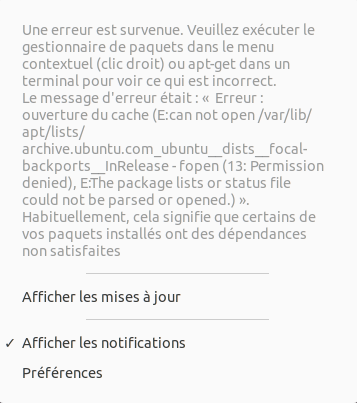
j'ai taper dans la console..
kosai@kosai-ACER:/var/lib/apt/lists$ lset il m afficher beaucoup des lignes écrite en rouge!!! comme..
archive.ubuntu.com_ubuntu_dists_focal-backports_universe_dep11_Components-amd64.yml.gz
archive.ubuntu.com_ubuntu_dists_focal-backports_universe_dep11_icons-48x48.tar.gz
archive.ubuntu.com_ubuntu_dists_focal-backports_universe_dep11_icons-64x64%402.tar.gz
archive.ubuntu.com_ubuntu_dists_focal-backports_universe_dep11_icons-64x64.tar.gz
archive.ubuntu.com_ubuntu_dists_focal_multiverse_dep11_Components-amd64.yml.gz
archive.ubuntu.com_ubuntu_dists_focal_multiverse_dep11_icons-48x48.tar.gz
archive.ubuntu.com_ubuntu_dists_focal_multiverse_dep11_icons-64x64%402.tar.gz
archive.ubuntu.com_ubuntu_dists_focal_multiverse_dep11_icons-64x64.tar.gz
archive.ubuntu.com_ubuntu_dists_focal-security_multiverse_dep11_Components-amd64.yml.gz
archive.ubuntu.com_ubuntu_dists_focal-security_multiverse_dep11_icons-48x48.tar.gz
archive.ubuntu.com_ubuntu_dists_focal-security_multiverse_dep11_icons-64x64%402.tar.gz
archive.ubuntu.com_ubuntu_dists_focal-security_multiverse_dep11_icons-64x64.tar.gz
#...etc
fichier sources.list
# deb cdrom:[Ubuntu 20.04.2.0 LTS _Focal Fossa_ - Release amd64 (20210209.1)]/ focal main restricted
# deb-src http://archive.ubuntu.com/ubuntu focal restricted #Added by software-properties

# See http://help.ubuntu.com/community/UpgradeNotes for how to upgrade to
# newer versions of the distribution.
deb http://archive.ubuntu.com/ubuntu focal restricted
# deb-src http://mirror.uchile.cl/ubuntu/ focal universe multiverse restricted #Added by software-properties

## Major bug fix updates produced after the final release of the
## distribution.
deb http://archive.ubuntu.com/ubuntu focal-updates restricted
# deb-src http://mirror.uchile.cl/ubuntu/ focal-updates universe multiverse restricted #Added by software-properties

## N.B. software from this repository is ENTIRELY UNSUPPORTED by the Ubuntu
## team. Also, please note that software in universe WILL NOT receive any
## review or updates from the Ubuntu security team.
deb http://archive.ubuntu.com/ubuntu focal universe
deb http://archive.ubuntu.com/ubuntu focal-updates universe

## N.B. software from this repository is ENTIRELY UNSUPPORTED by the Ubuntu
## team, and may not be under a free licence. Please satisfy yourself as to
## your rights to use the software. Also, please note that software in
## multiverse WILL NOT receive any review or updates from the Ubuntu
## security team.
deb http://archive.ubuntu.com/ubuntu focal multiverse
deb http://archive.ubuntu.com/ubuntu focal-updates multiverse

## N.B. software from this repository may not have been tested as
## extensively as that contained in the main release, although it includes
## newer versions of some applications which may provide useful features.
## Also, please note that software in backports WILL NOT receive any review
## or updates from the Ubuntu security team.
deb http://archive.ubuntu.com/ubuntu focal-backports restricted universe multiverse
# deb-src http://mirror.uchile.cl/ubuntu/ focal-backports restricted universe multiverse #Added by software-properties

## Uncomment the following two lines to add software from Canonical's
## 'partner' repository.
## This software is not part of Ubuntu, but is offered by Canonical and the
## respective vendors as a service to Ubuntu users.
deb http://archive.canonical.com/ubuntu focal partner
deb-src http://archive.canonical.com/ubuntu focal partner

deb http://archive.ubuntu.com/ubuntu focal-security restricted
# deb-src http://mirror.uchile.cl/ubuntu/ focal-security universe multiverse restricted #Added by software-properties
deb http://archive.ubuntu.com/ubuntu focal-security universe
deb http://archive.ubuntu.com/ubuntu focal-security multiverse

# This system was installed using small removable media
# (e.g. netinst, live or single CD). The matching "deb cdrom"
# entries were disabled at the end of the installation process.
# For information about how to configure apt package sources,
# see the sources.list(5) manual.
deb http://fr.archive.ubuntu.com/ubuntu/ precise main restricted universe multiverse
deb http://fr.archive.ubuntu.com/ubuntu/ precise-updates main restricted universe multiverse
deb http://fr.archive.ubuntu.com/ubuntu/ precise-backports main restricted universe multiverse
deb http://fr.archive.ubuntu.com/ubuntu/ precise-proposed main restricted universe multiverse

deb http://security.ubuntu.com/ubuntu precise-security main restricted universe multiverse
deb http://archive.canonical.com/ubuntu precise partner
deb http://extras.ubuntu.com/ubuntu precise main
j’espère quelqu'un peut m'aider... merci!
Merci beaucoup pour votre temps!!
Dernière modification par kosai (Le 07/08/2021, à 00:08)
Hors ligne
#2 Le 06/08/2021, à 17:09
- abelthorne

Re : [Resolu] probleme d'installation E:Le paquet n'a pas de vers suseptibl
Le message disant qu'un paquet n'a pas de version susceptible d'être installée peut parfois venir de logiciels qui ne sont plus dans les dépôts actuels. Cela dit, screen a l'air d'être dans les dépôts actuels.
Le message parlant de dépendances non satisfaites, si les dépôts sont corrects, vient généralement de paquets qui provoquent des conflits parce qu'ils ont été installés manuellement ou viennent de dépôts obsolètes, etc. et ne sont plus adaptés à une version d'Ubuntu.
Concernant ton sources.list, il y a deux gros problèmes :
1) il manque le dépôt main, qui est le dépôt principal fournissant la plupart des paquets ;
2) il y a des dépôts de la version Precise (12.04) qui n'ont absolument rien à faire là.
Le point 1 explique très certainement tes deux problèmes.
On va commencer par corriger ça. Édite le fichier :
sudo nano /etc/apt/sources.listSupprime tout. Tu peux utiliser ctrl + K pour effacer rapidement des lignes entières avec Nano. Colle le contenu propre suivant à la place :
# See http://help.ubuntu.com/community/UpgradeNotes for how to upgrade to
# newer versions of the distribution.
deb http://fr.archive.ubuntu.com/ubuntu/ focal main restricted

## Major bug fix updates produced after the final release of the
## distribution.
deb http://fr.archive.ubuntu.com/ubuntu/ focal-updates main restricted

## N.B. software from this repository is ENTIRELY UNSUPPORTED by the Ubuntu
## team. Also, please note that software in universe WILL NOT receive any
## review or updates from the Ubuntu security team.
deb http://fr.archive.ubuntu.com/ubuntu/ focal universe
deb http://fr.archive.ubuntu.com/ubuntu/ focal-updates universe

## N.B. software from this repository is ENTIRELY UNSUPPORTED by the Ubuntu
## team, and may not be under a free licence. Please satisfy yourself as to
## your rights to use the software. Also, please note that software in
## multiverse WILL NOT receive any review or updates from the Ubuntu
## security team.
deb http://fr.archive.ubuntu.com/ubuntu/ focal multiverse
deb http://fr.archive.ubuntu.com/ubuntu/ focal-updates multiverse

## N.B. software from this repository may not have been tested as
## extensively as that contained in the main release, although it includes
## newer versions of some applications which may provide useful features.
## Also, please note that software in backports WILL NOT receive any review
## or updates from the Ubuntu security team.
deb http://fr.archive.ubuntu.com/ubuntu/ focal-backports main restricted universe multiverse

## Uncomment the following two lines to add software from Canonical's
## 'partner' repository.
## This software is not part of Ubuntu, but is offered by Canonical and the
## respective vendors as a service to Ubuntu users.
deb http://archive.canonical.com/ubuntu focal partner

deb http://security.ubuntu.com/ubuntu focal-security main restricted
deb http://security.ubuntu.com/ubuntu focal-security universe
deb http://security.ubuntu.com/ubuntu focal-security multiverse
Enregistre avec ctrl + O, valide le nom de fichier avec entrée, puis ferme Nano avec ctrl + X pour retourner à l'invite.
Ensuite, recharge la liste des dépôts et donne le retour :
sudo apt-get updateDernière modification par abelthorne (Le 06/08/2021, à 17:10)
Hors ligne
#3 Le 07/08/2021, à 00:05
- kosai
Re : [Resolu] probleme d'installation E:Le paquet n'a pas de vers suseptibl
WoooW...c'est magiq!! :o
:o
Merciiii beaucoup abelthorne!!!
Hors ligne
#4 Le 07/08/2021, à 08:44
- abelthorne
Re : [Resolu] probleme d'installation E:Le paquet n'a pas de vers suseptibl
Donne-moi le retour de la dernière commande pour vérifier que tout va bien.
Et donne aussi celui de :
apt list | grep "installé, local"Hors ligne